01
CryoSieve
Particle sorting and sieving for single-particle cryo-EM. CryoSieve helps remove unnecessary particles from final stacks so reconstruction quality can improve.
Cryo-EM workflow copilot
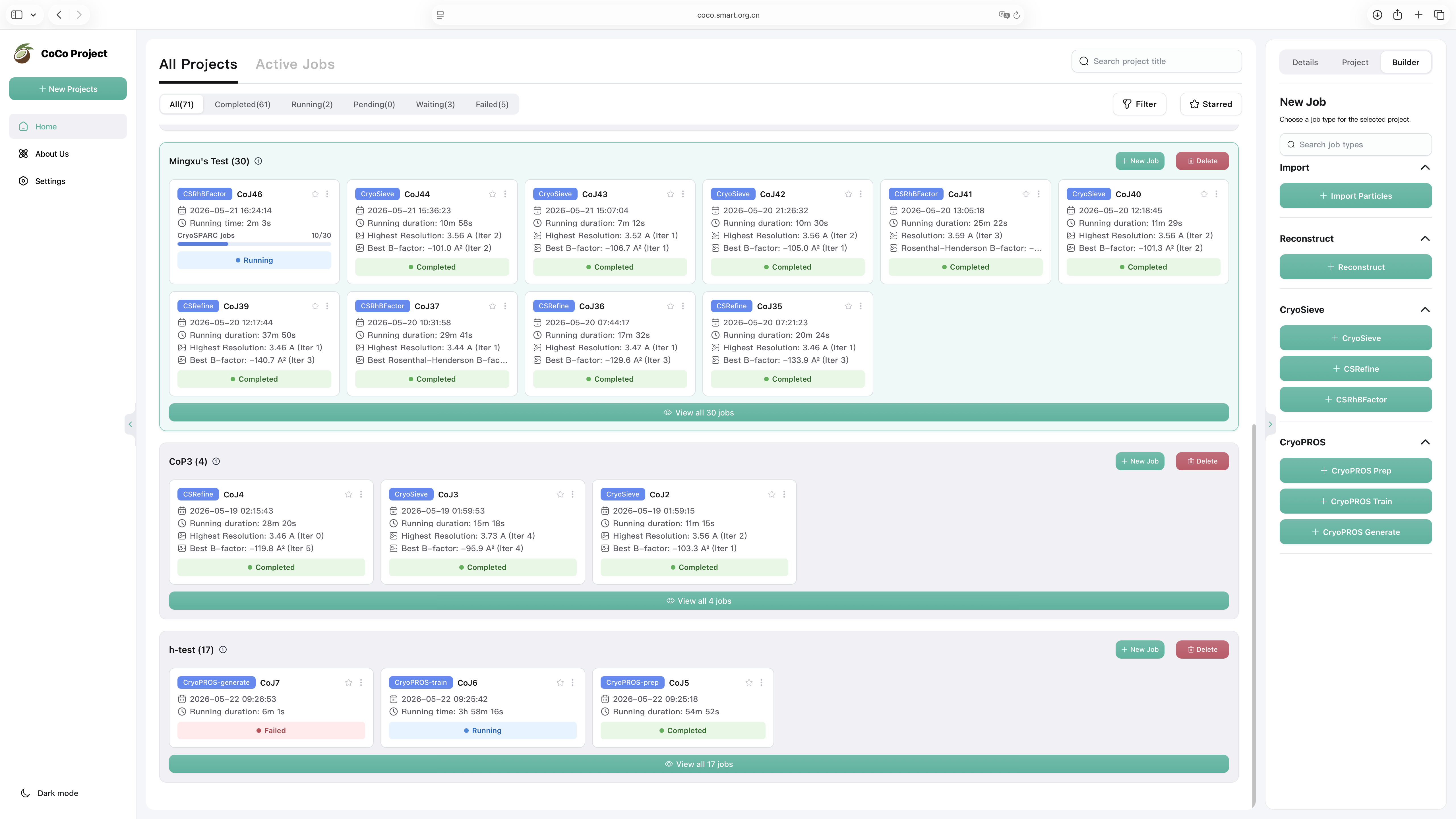
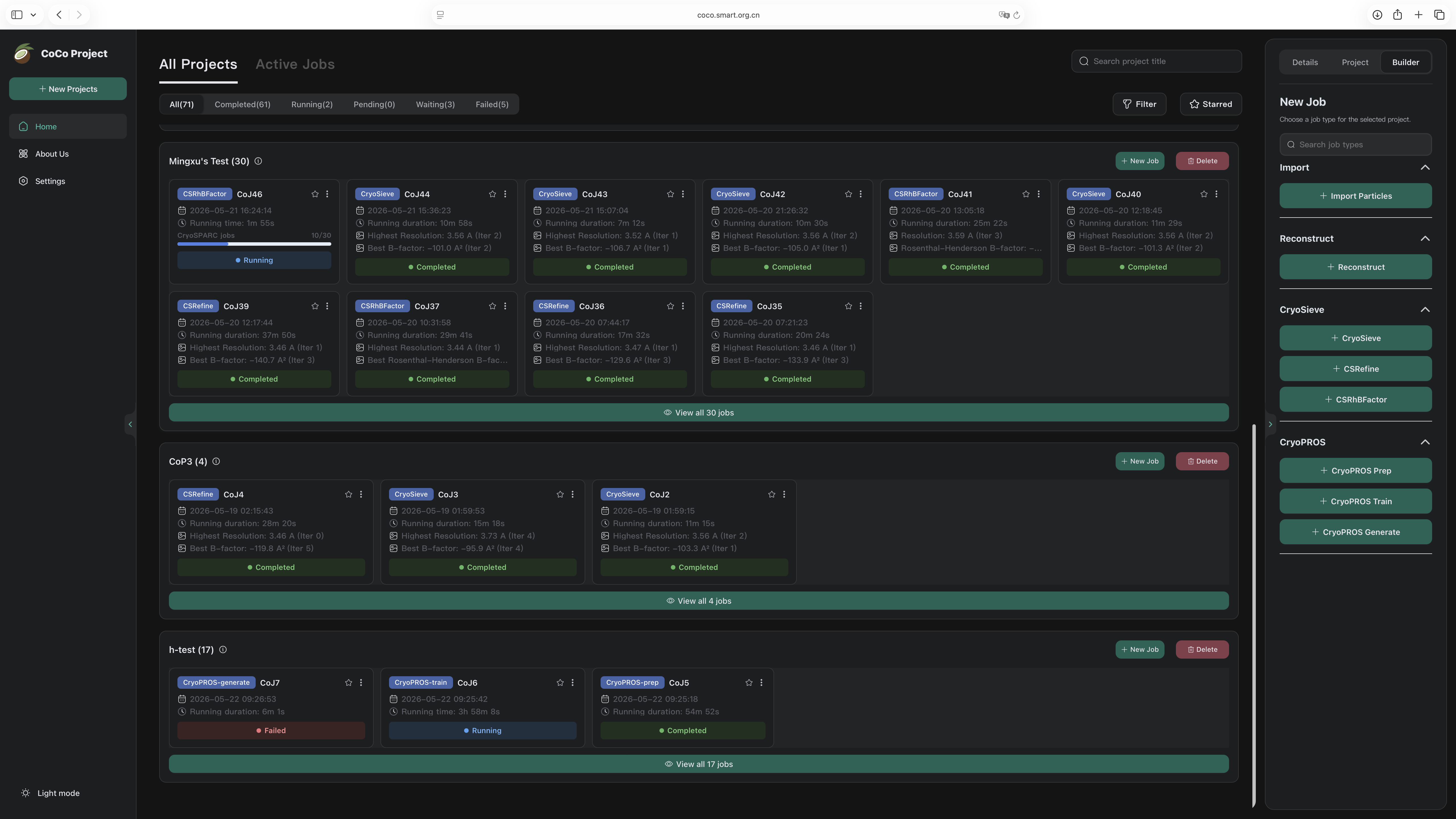
CoCo acts as a copilot for your cryo-EM workflow, integrating CryoSieve, CryoPROS, and CTFA directly into the process you already run.
Particle sorting and sieving for single-particle cryo-EM. CryoSieve helps remove unnecessary particles from final stacks so reconstruction quality can improve.
A preferred-orientation correction framework for single-particle cryo-EM, using AI-generated auxiliary particles and co-refinement.
Reserved for the CTFA module. It appears in the CoCo system model as a planned capability and is marked TBD until public details are ready.
CoCo is the only download target on this page. CryoSieve, CryoPROS, and CTFA are accessed through CoCo, not as standalone downloads.
Packaged CoCo v0.2.0 release. View change log
"A minority of final stacks yields superior amplitude in single-particle cryo-EM"
Nature Communications, 2023If CryoSieve contributes to your work, please cite the paper above. Full demo datasets and expected results are available at cryosieve-demos.
"CryoPROS: Correcting misalignment caused by preferred orientation using AI-generated auxiliary particles"
Nature Communications, 2025If CryoPROS contributes to your work, please cite the paper above.
CoCo wrapped module
An advanced particle sorting and sieving solution for single-particle cryo-EM analysis. CryoSieve eliminates unnecessary particles from final stacks, producing cleaner density maps with measurably higher resolution.
v1.3.0
CryoSieve is an advanced software solution designed for particle sorting and sieving in single-particle analysis for cryo-EM. Supported by extensive experimental results, it has demonstrated superior performance compared to other cryo-EM particle sorting algorithms. For certain datasets, the precision of CryoSieve's particle subset selection approaches the theoretical limit.
Validated on publicly available cryo-EM datasets from EMPIAR:
| Dataset | Particles | Mass (kDa) | Source |
|---|---|---|---|
| TRPA1 | 43,585 | 688 | EMPIAR-10024 |
| Hemagglutinin | 130,000 | 150 | EMPIAR-10097 |
| LAT1 | 250,712 | 172 | EMPIAR-10264 |
| pfCRT | 16,905 | 102 | EMPIAR-10330 |
| TSHR-Gs | 41,054 | 125 | EMPIAR-11120 |
| TRPM8 | 42,040 | 513 | EMPIAR-11233 |
| Apoferritin | 382,391 | 440 | EMPIAR-10200 |
| Streptavidin | 23,991 | 52 | EMPIAR-10269 |
The sieving process involves iterative rounds of 3D reconstruction and particle filtering. In each round, CryoSieve analyzes the reconstructed density map, identifies particles that degrade the final resolution, and removes them. The high-pass cutoff frequency typically increases with each iteration, progressively refining the particle subset.
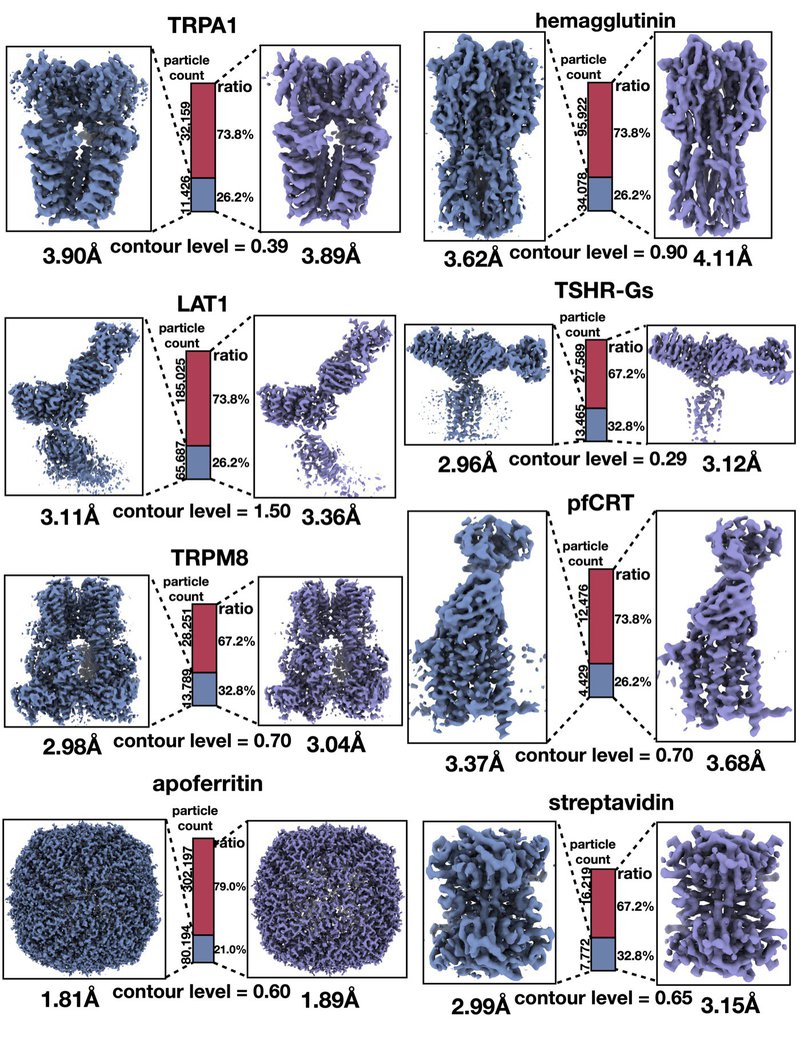
"A minority of final stacks yields superior amplitude in single-particle cryo-EM"
Nature Communications, 2023If CryoSieve contributes to your work, please cite the paper above. Full demo datasets and expected results are available at cryosieve-demos.
CryoSieve operates as a wrapped analysis module inside the CoCo unified GUI. Open it from the CoCo workbench, point it at your particle stack, and let it sieve while you continue working on other parts of your pipeline. The module integrates with Relion for 3D reconstruction and postprocessing, and supports CryoSPARC refinement workflows.
CoCo wrapped module
A preferred-orientation correction framework for single-particle cryo-EM, using AI-generated auxiliary particles and co-refinement of synthesized and experimental data.
v1.0.1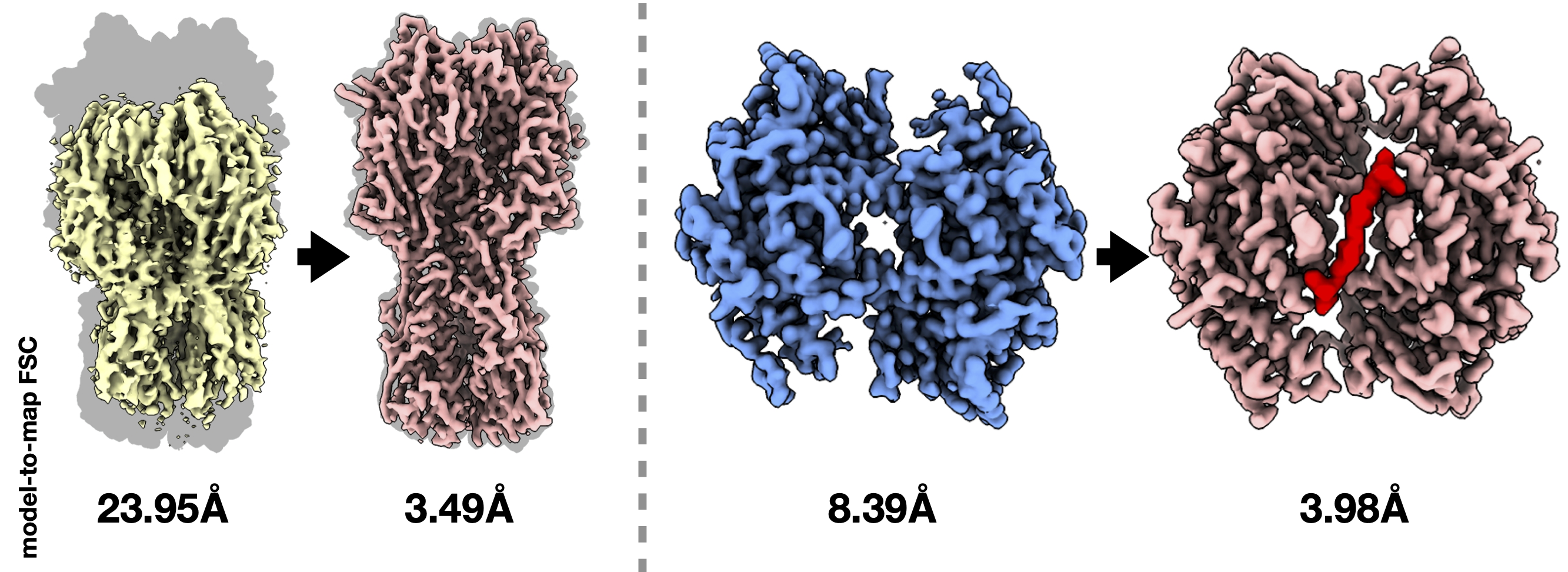
CryoPROS addresses misalignment errors caused by preferred orientation in single-particle cryo-EM. It uses AI to generate auxiliary particles and performs co-refinement between synthesized and experimental data, correcting orientation bias that would otherwise degrade reconstruction.
CryoPROS uses AI to generate auxiliary particles that compensate for preferred-orientation bias during cryo-EM reconstruction. These synthetic particles are co-refined with experimental data, producing a more isotropic orientation distribution and reducing misalignment errors.
"CryoPROS: Correcting misalignment caused by preferred orientation using AI-generated auxiliary particles"
Nature Communications, 2025If CryoPROS contributes to your work, please cite the paper above.
CryoPROS is accessed through the CoCo GUI. Launch it from the workbench, supply your particle set, and let the AI-assisted correction run alongside your existing refinement workflow.
Planned module
Reserved for the CTFA module. It appears in the CoCo system model as a planned capability and is marked TBD until public details are ready.
TBDCTFA is a planned addition to the CoCo module family. Details are forthcoming once the module reaches a public milestone. For now, it is represented in the system map so researchers know it is on the roadmap.
CTFA is represented in the CoCo system map so researchers can track the full project scope. No separate download or release is available. Check back for updates.
CoCo v0.2.0 release guide
Extract the packaged release, prepare the managed runtime, then verify the web application and its external cryo-EM dependencies.
v0.2.0Fast path
tar -xzf coco-0.2.0.tar.gz
cd cocobin/coco-install-runtime.shjava -jar backend/<coco-backend-jar>.jarhttp://localhost:8078Before install
Prepare a Linux or macOS machine with a writable installation directory and these command-line tools:
bashtar and gzipawk, date, and duAccess to CryoSPARC and RELION is required only for workflows that use them. CryoSieve and CryoPROS are bundled with CoCo and do not need separate Python environments in a normal packaged deployment.
Release archive
Copy coco-0.2.0.tar.gz to the target machine, extract it, and enter the release directory.
tar -xzf coco-0.2.0.tar.gz
cd coco
Expected layout:
coco/
├── bin/
│   └── coco-install-runtime.sh
├── backend/
│   └── <coco-backend-jar>.jar
├── modules/
│   ├── cryosieve/
│   └── cryopros/
├── runtime/
├── runtime-packs/
│   └── coco-runtime.tar.gz
├── .gitmodules
└── modules.lock
backend/ contains the runnable backend and embedded frontend.bin/ contains the runtime installer and validator.runtime-packs/ contains the managed environment archive.modules/ contains bundled CryoSieve and CryoPROS resources.modules/cryosieve/cryosieve_video_tutorial.mp4 is intentionally omitted and is not required at runtime.
Managed environment
Run the installer from the extracted coco/ directory.
bin/coco-install-runtime.shThe installer checks the runtime archive for unsafe paths, extracts it, runs conda-unpack, validates required commands, and writes the backend profile.
runtime/envs/coco-runtime/runtime/coco-runtime-profile.jsonValidation covers Python, CryoSPARC conversion, MPI, RELION, PyTorch launch, and image-handling commands:
pythoncsparc2star.pystar.pympirunrelion_reconstruct_mpirelion_reconstructrelion_postprocesstorchrunrelion_image_handlerCryoSieve and CryoPROS are bundled modules and are not validated as separate top-level CLI commands.
bin/coco-install-runtime.sh --check-onlybin/coco-install-runtime.sh --forcebin/coco-install-runtime.sh --root /absolute/path/to/coco--root must point to the extracted coco/ directory. Do not combine --force with --check-only.
Launch
Start the backend from the extracted release directory. It also serves the built frontend.
java -jar backend/<coco-backend-jar>.jarjava -jar backend/<coco-backend-jar>.jar --server.port=8080java -jar coco/backend/<coco-backend-jar>.jar --server.port=8078The backend normally infers the runtime profile from the release layout. Provide it explicitly only when the standard layout is unavailable.
java -Dcoco.runtime.profile=/absolute/path/to/coco/runtime/coco-runtime-profile.json \
  -jar backend/<coco-backend-jar>.jar
Validation
Confirm the installed environment and runtime profile exist, then run the validator.
runtime/envs/coco-runtime/
runtime/coco-runtime-profile.jsonbin/coco-install-runtime.sh --check-onlyhttp://localhost:8078.READY.GET /api/open/settings/managed-runtimeApplication settings
Default settings are bundled in the backend JAR and can be overridden with Spring Boot command-line properties.
server.port=8078
app.auth.mode=DISABLED
app.auth.users-file=auth/users.json
Authentication modes are DISABLED, BOOTSTRAP, and ENFORCED. When enabled, file-based users are stored relative to the process working directory.
java -jar backend/<coco-backend-jar>.jar \
  --app.auth.mode=BOOTSTRAP \
  --app.auth.bootstrap-admin-username=admin \
  --app.auth.bootstrap-admin-password=ChangeMe123 \
--app.auth.bootstrap-admin-must-change-password=truehttp://localhost:8078/home./login-verification.BOOTSTRAP creates the administrator only when auth/users.json is missing or empty. Changing the bootstrap password later does not overwrite an existing account.
java -jar backend/<coco-backend-jar>.jar \
  --server.port=8078 \
  --app.auth.mode=BOOTSTRAP \
  --app.auth.bootstrap-admin-username=admin \
--app.auth.reset-admin-password=ChangeMe123Removing auth/users.json deletes stored file-based users. Do not remove it in production unless that is intentional.
rm -f auth/users.jsonSite integration
Only CryoSPARC and RELION should appear as user-facing external dependencies in Environment Check.
READY.CryoSieve and CryoPROS remain built-in modules under modules/ and use runtime/envs/coco-runtime.
Cluster execution
A lane stores fixed settings for a queue or partition. GPU count and other per-job resources are selected in each job dialog.
module load.Do not place fixed node, task, or GPU requests in the lane template:
#SBATCH -N 1
#SBATCH --nodes=1
#SBATCH -n 1
#SBATCH --ntasks=1
#SBATCH --gpus=1
#SBATCH --gpus-per-node=1
#SBATCH --gpus-per-task=1
#SBATCH --gres=gpu:1
CoCo generates those values from the job dialog:
#SBATCH -N 1
#SBATCH --ntasks=<task-count>
#SBATCH --gpus=<job num_gpus>
export COCO_NUM_GPUS=<job num_gpus>
export COCO_NPROC_PER_NODE=<job num_gpus>#!/bin/bash
#SBATCH --partition=<gpu_partition>
#SBATCH --mem=128G
#SBATCH --output=coco-%j.out
#SBATCH --error=coco-%j.errMax GPUs: 4If a request exceeds the lane's Max GPUs, CoCo rejects the submission. CryoSieve and CryoPROS jobs must not activate a separate Python or conda environment in the lane.
Package inventory
The package includes metadata for core, cryosieve, and cryopros.
GET /api/open/modules
GET /api/open/modules/installed
GET /api/open/modules/job-types
GET /api/open/modules/job-type-modulesPARTICLERESTACK_PARTICLESRECONSTRUCTCRYOSIEVECSREFINECSRHBFACTORCRYOPROS_PREPCRYOPROS_TRAINCRYOPROS_GENERATESubmission guard
The backend requires the managed runtime to report READY before any supported job type can be submitted or run.
activationCmd values are ignored for managed jobs.Acceptance checks
Test the installed release in a real project using the supported task relationships.
PARTICLE job.RESTACK_PARTICLES and RECONSTRUCT.CRYOSIEVE, then CSREFINE and CSRHBFACTOR.CRYOPROS_PREP, CRYOPROS_TRAIN, and CRYOPROS_GENERATE.export_cryopros.py resolves from the module resource or classpath fallback.Troubleshooting
java -jar backend/<coco-backend-jar>.jar --server.port=8080Confirm the complete release contains runtime-packs/coco-runtime.tar.gz.
bin/coco-install-runtime.sh --check-onlybin/coco-install-runtime.sh --forceStart from the extracted directory or pass runtime/coco-runtime-profile.json explicitly with -Dcoco.runtime.profile.
Return to Environment Check and verify the configured shell snippets. Keep built-in modules on the managed runtime.
modules/cryosieve/module.yaml
modules/cryosieve/jobTypeMapping.json
modules/cryopros/module.yaml
modules/cryopros/jobTypeMapping.json
modules/cryopros/scripts/export_cryopros.py
modules.lockRelease notes
This release brings task relationships and user access into the project workflow, making complex cryo-EM work easier to trace, share, and administer.
Major release
CoCo v0.2.0 keeps the unified workbench introduced in v0.1.0 and adds a clearer model for both computational relationships and team access.
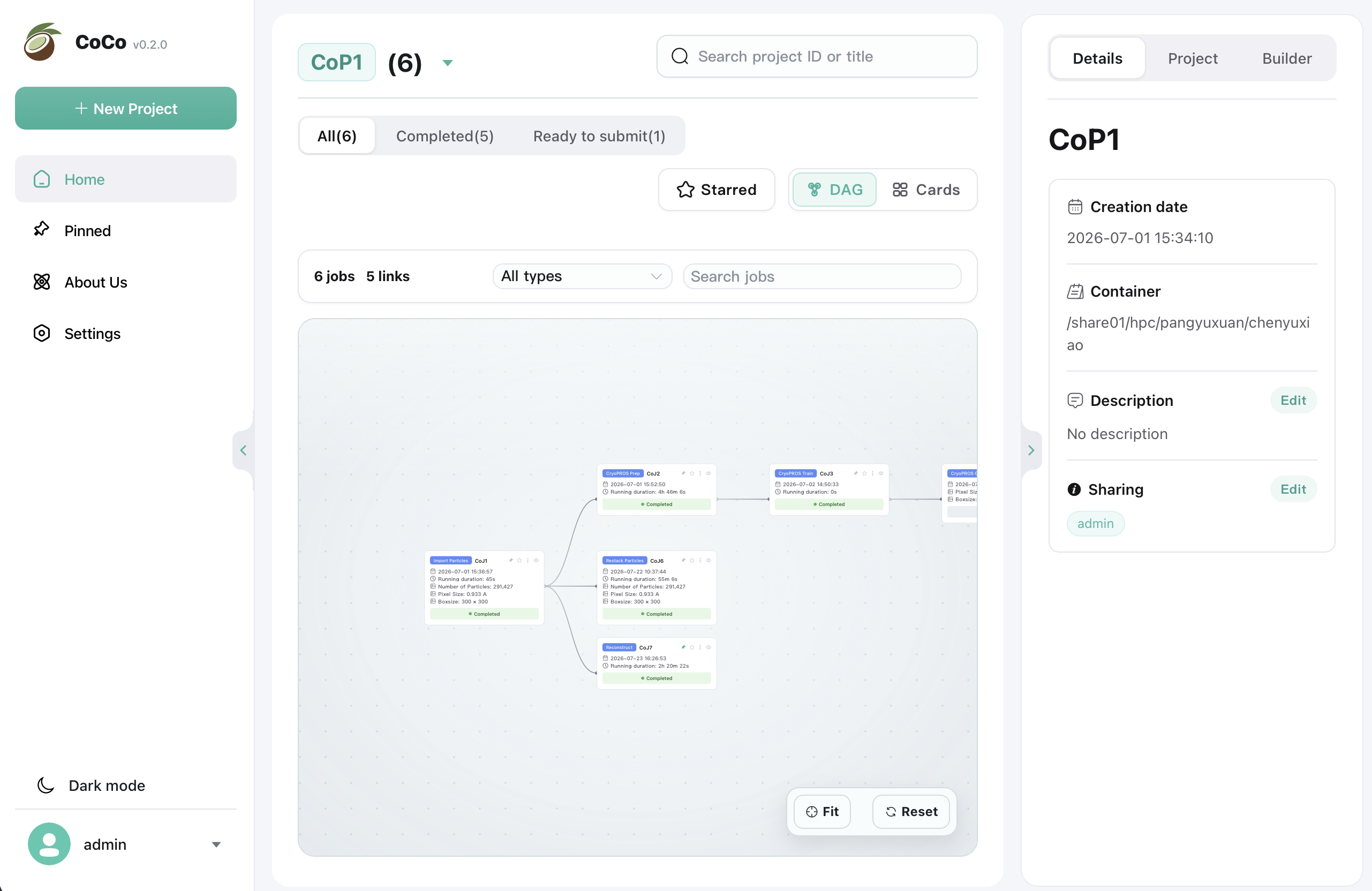
Project data flow
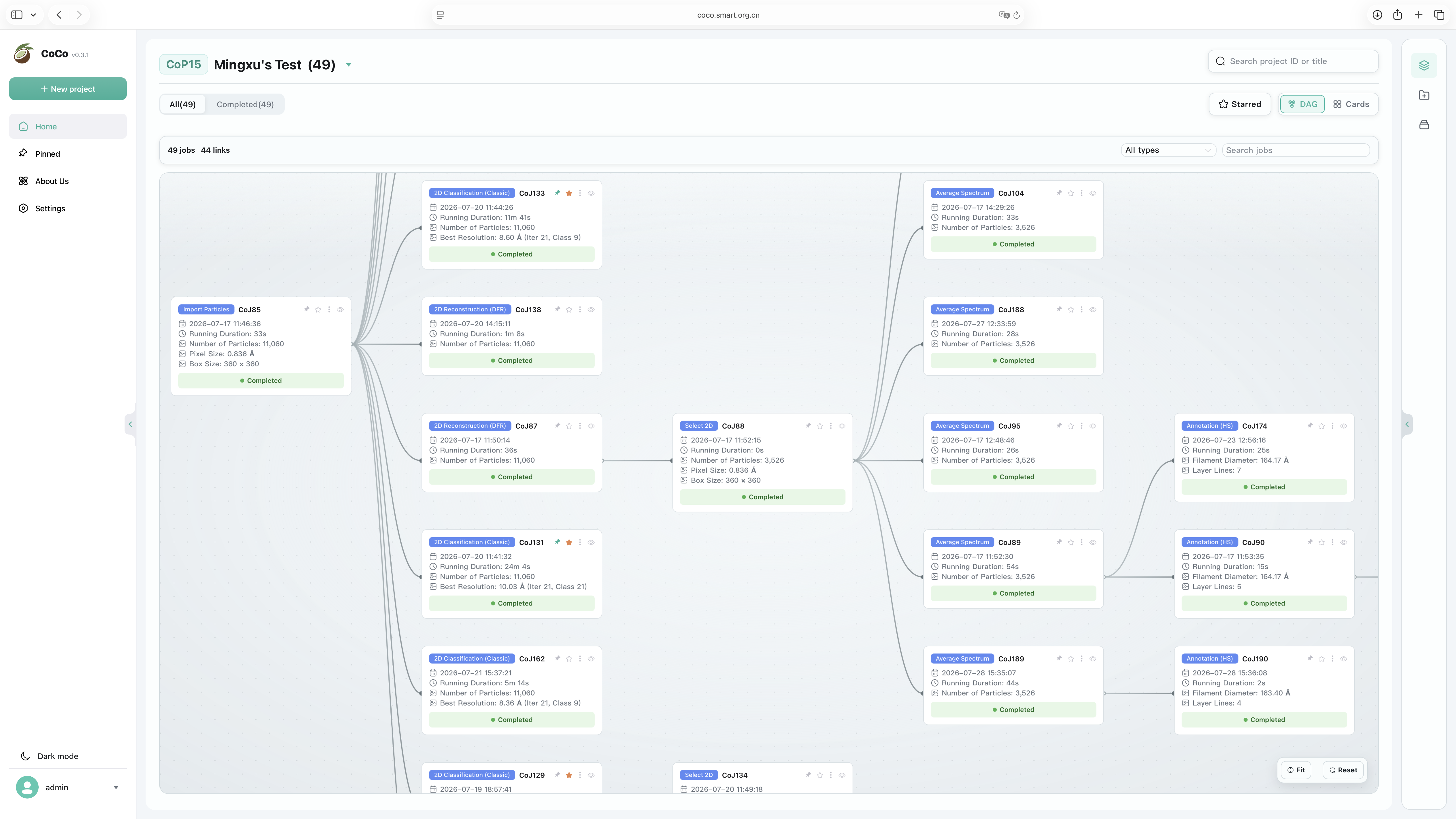
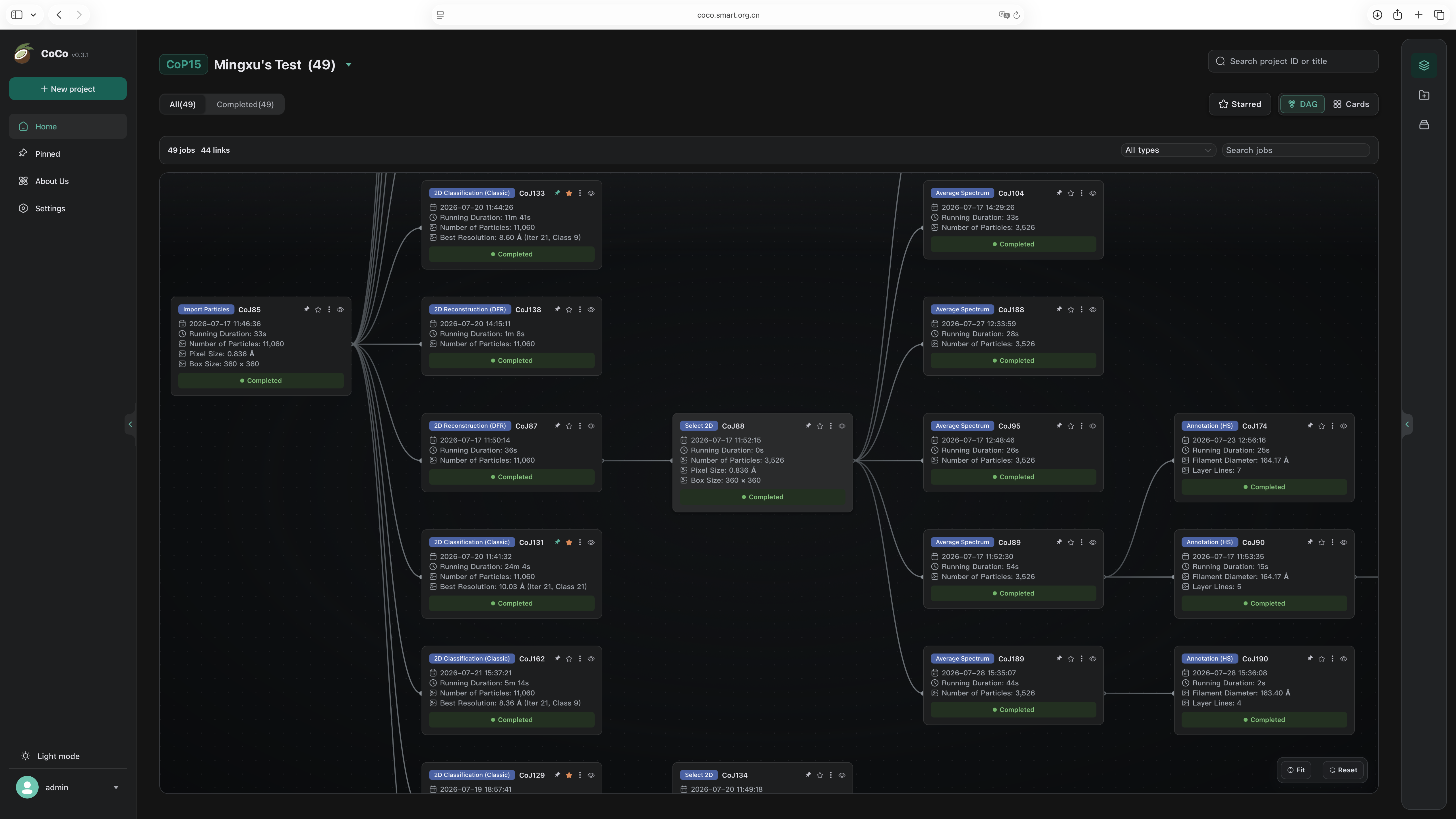
The project task page now opens in a graph view by default. Jobs and their upstream and downstream relationships appear together, so researchers can recover context without moving through individual task pages.
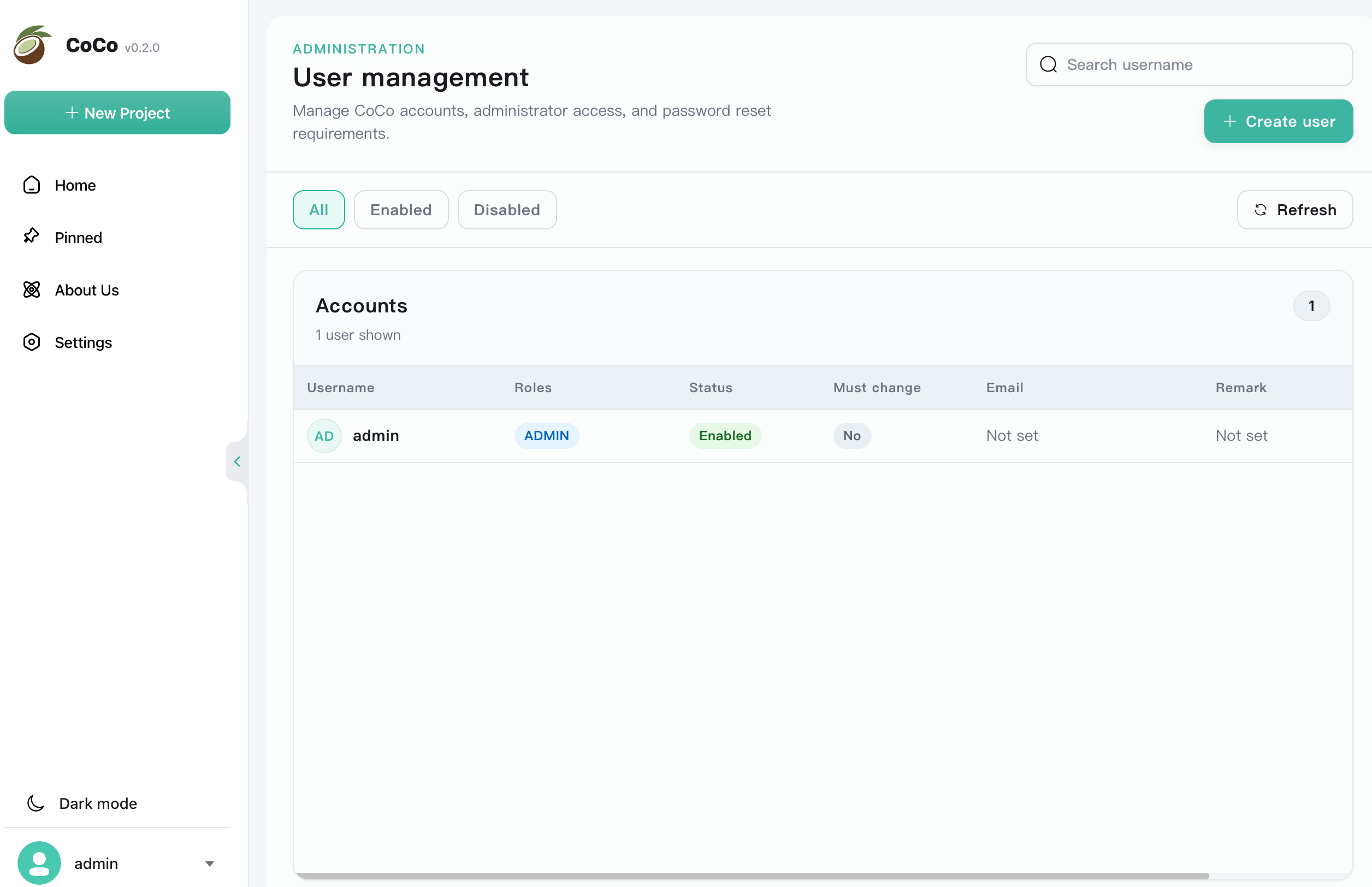
Shared access
Projects can now be shared with other CoCo users and assigned access permissions. Administrators also gain a dedicated user-management surface for maintaining accounts and deployment access.
Also improved
stdout, stderr, and event logs are gathered into one consistent job-level record.
Status, progress, and run controls are clearer across the home page, sidebar, and job details.
Connection validation and email configuration make deployment checks more dependable.
CryoPROS Generate jobs now parse and present particle metrics with the rest of the result context.
Ready to update
Archived CoCo v0.1.0 release guide
Download the packaged archive, install the managed runtime, then start the Spring Boot backend.
v0.1.0Fast path
tar -xzf coco.tar.gz
cd cocobin/coco-install-runtime.shjava -jar backend/<backend runnable jar>http://localhost:8078Before install
Required runtime tools:
CoCo itself is packaged as a Spring Boot jar with the built frontend embedded. CryoSieve and CryoPROS use CoCo's managed runtime installed from runtime-packs/coco-runtime.tar.gz; users should not prepare separate CryoSieve or CryoPROS Python environments.
Release archive
Given the release artifact coco.tar.gz, unpack it and enter the release directory.
tar -xzf coco.tar.gz
cd cocoExpected layout:
coco/
├── bin/
│ └── coco-install-runtime.sh
├── backend/
│ └── <backend runnable jar>
├── modules/
│ ├── cryosieve/
│ └── cryopros/
├── runtime/
├── runtime-packs/
│ └── coco-runtime.tar.gz
├── .gitmodules
└── modules.lockThe CryoSieve tutorial movie modules/cryosieve/cryosieve_video_tutorial.mp4 is intentionally not included in the package and is not required for CoCo runtime.
Managed environment
From the unpacked coco/ directory, install the unified CryoSieve and CryoPROS runtime.
bin/coco-install-runtime.shThis unpacks runtime-packs/coco-runtime.tar.gz, runs conda-unpack, validates the CryoSieve and CryoPROS command-line tools, and prepares the managed runtime under:
runtime/envs/coco-runtimeIt also writes the runtime profile consumed by CoCo:
runtime/coco-runtime-profile.jsonIf the runtime already exists, validate it and rewrite the profile:
bin/coco-install-runtime.sh --check-onlyTo remove and reinstall the runtime:
bin/coco-install-runtime.sh --forceLaunch
Use the jar found under backend/.
java -jar backend/<backend runnable jar>You may also start from the parent directory, which is useful when existing project or auth data is relative to that working directory.
java -jar coco/backend/<backend runnable jar> --server.port=8078In packaged releases, CoCo first checks ./runtime/coco-runtime-profile.json, then infers coco/runtime/coco-runtime-profile.json from the jar location. If needed, override the runtime profile explicitly.
java -Dcoco.runtime.profile=/absolute/path/to/coco/runtime/coco-runtime-profile.json \
-jar coco/backend/<backend runnable jar> --server.port=8078The default backend port is 8078. Open:
http://localhost:8078Settings
Default application settings are bundled in the jar:
server.port=8078
app.auth.mode=DISABLEDTo override settings at runtime, provide Spring Boot properties. For example, to use another port:
java -jar backend/<backend runnable jar> --server.port=8080To enable auth, use one of the supported modes:
java -jar backend/<backend runnable jar> \
--app.auth.mode=BOOTSTRAP \
--app.auth.bootstrap-admin-username=admin \
--app.auth.bootstrap-admin-password=change-meSupported auth modes:
DISABLEDBOOTSTRAPENFORCEDWhen auth is enabled, file-based users are stored under auth/users.json, relative to the process working directory.
Auth flow
When auth is enabled, protected pages redirect unauthenticated users to /login-verification. Use the configured account and password to sign in.
For a fresh release test with bootstrap auth:
java -jar backend/<backend runnable jar> \
--server.port=8078 \
--app.auth.mode=BOOTSTRAP \
--app.auth.bootstrap-admin-username=admin \
--app.auth.bootstrap-admin-password=ChangeMe123 \
--app.auth.bootstrap-admin-must-change-password=trueThen open:
http://localhost:8078/home/home redirects to /login-verification.admin and password ChangeMe123.mustChangePassword is true, CoCo redirects to /change-password./home.BOOTSTRAP only creates the bootstrap admin when auth/users.json is missing or empty. If auth/users.json already contains users, changing app.auth.bootstrap-admin-password does not overwrite the existing admin password.
To reset the bootstrap admin password intentionally:
java -jar backend/<backend runnable jar> \
--server.port=8078 \
--app.auth.mode=BOOTSTRAP \
--app.auth.bootstrap-admin-username=admin \
--app.auth.reset-admin-password=ChangeMe123After reset, sign in with admin / ChangeMe123. CoCo will require a password change.
You can remove the test user file and bootstrap again only for disposable local tests.
rm -f auth/users.json
java -jar backend/<backend runnable jar> \
--server.port=8078 \
--app.auth.mode=BOOTSTRAP \
--app.auth.bootstrap-admin-username=admin \
--app.auth.bootstrap-admin-password=ChangeMe123Do not delete auth/users.json in production unless you intend to remove the stored users.
Environment check
Only these should appear as user-facing external dependencies in Environment Check:
After starting CoCo:
READY.The managed runtime status is also available at:
GET /api/open/settings/managed-runtimeCryoSieve and CryoPROS are built-in modules. They should not appear as top-level external dependency cards. Their module metadata and resources are packaged under modules/, and their CLI environment is provided by runtime/envs/coco-runtime.
Compute lanes
CoCo lanes describe how jobs are submitted to a compute environment. For a SLURM lane, the lane should contain the fixed SLURM template for that queue or partition, while per-job resources such as GPU count are chosen in each job dialog.
For a single-node GPU lane where different jobs may request different GPU counts, configure the lane as a capacity limit instead of a fixed GPU request.
Max GPUs = 4.module load commands.Avoid these lines in the SLURM lane template:
#SBATCH -N 1
#SBATCH --nodes=1
#SBATCH -n 1
#SBATCH --ntasks=1
#SBATCH --gpus=1
#SBATCH --gpus-per-node=1
#SBATCH --gpus-per-task=1
#SBATCH --gres=gpu:1CoCo generates those resource lines dynamically from the job dialog. For GPU jobs, the job dialog determines the requested GPU count, and CoCo writes a single-node SLURM header like:
#SBATCH -N 1
#SBATCH --ntasks=<task-count>
#SBATCH --gpus=<job num_gpus>
export COCO_NUM_GPUS=<job num_gpus>
export COCO_NPROC_PER_NODE=<job num_gpus>Example SLURM lane for a single-node GPU partition with up to 4 GPUs:
#!/bin/bash
#SBATCH --partition=<gpu_partition>
#SBATCH --mem=128G
#SBATCH --output=coco-%j.out
#SBATCH --error=coco-%j.errSet:
Max GPUs: 4Then each job chooses its actual GPU count in the job creation dialog:
1 GPU, CoCo adds #SBATCH --gpus=12 GPUs, CoCo adds #SBATCH --gpus=24 GPUs, CoCo adds #SBATCH --gpus=4If the job requests more GPUs than the lane's Max GPUs, CoCo rejects the submission.
Example Local Environment:
module purge
module load cuda/12.1
module load relionFor CryoSieve and CryoPROS jobs, do not activate a separate Python or conda environment in the lane. CoCo activates the managed runtime automatically.
Module state
The package includes module metadata for:
corecryosievecryoprosYou can verify module state through the module API after startup:
GET /api/open/modules
GET /api/open/modules/installed
GET /api/open/modules/job-types
GET /api/open/modules/job-type-modulesExpected job families include:
PARTICLERESTACK_PARTICLESRECONSTRUCTCRYOSIEVECSREFINECSRHBFACTORCRYOPROS_PREPCRYOPROS_TRAINCRYOPROS_GENERATERuntime rules
Jobs that require the managed runtime include:
RESTACK_PARTICLESCRYOSIEVECSREFINECSRHBFACTORCRYOPROS_PREPCRYOPROS_TRAINCRYOPROS_GENERATEDraft creation and editing are allowed when the runtime is missing, so users can prepare jobs before installation. Submit Now and existing draft submit are blocked until the runtime status is READY. Generated bash and SLURM scripts automatically activate runtime/envs/coco-runtime; for managed jobs, any old activationCmd value is ignored to avoid activating a different environment.
Release checks
After installation, test these flows in a real project:
PARTICLE job.RESTACK_PARTICLES from PARTICLE.RECONSTRUCT from PARTICLE or RESTACK_PARTICLES.CRYOSIEVE from PARTICLE or RESTACK_PARTICLES.CSREFINE and CSRHBFACTOR from CRYOSIEVE.CRYOPROS_PREP from PARTICLE or RESTACK_PARTICLES.CRYOPROS_TRAIN from CRYOPROS_PREP.CRYOPROS_GENERATE from CRYOPROS_TRAIN.CRYOPROS_GENERATE and confirm export_cryopros.py is resolved from the CryoPROS module resource or classpath fallback.Troubleshooting
Start on another port:
java -jar backend/<backend runnable jar> --server.port=8080Run from the unpacked coco/ directory:
bin/coco-install-runtime.sh --check-onlyIf validation fails because files are missing or stale, reinstall:
bin/coco-install-runtime.sh --forceThen restart or refresh CoCo and check Settings → Environment Check → Managed CoCo Runtime.
Reopen Settings → Environment Check and verify the configured shell snippets. New lanes should use external dependency environment setup only; CryoSieve and CryoPROS are handled by the managed runtime.
This is expected. cryosieve_video_tutorial.mp4 is intentionally excluded from the release package and is not required for CoCo runtime.
Check that the unpacked release still contains:
modules/cryosieve/module.yaml
modules/cryosieve/jobTypeMapping.json
modules/cryopros/module.yaml
modules/cryopros/jobTypeMapping.json
modules/cryopros/scripts/export_cryopros.py
modules.lockIf installing from source rather than from coco.tar.gz, make sure the submodule commits recorded in modules.lock have been pushed to their remotes. Otherwise git submodule update --init --recursive or packaging/validate-modules.js remote reachability checks may fail.